

Managing virtual machines is becoming more and more difficult for IT enterprises these days. The struggle grows with more applications, more users, tighter security expectations, and somehow… the budget isn’t growing at the same pace.
Most IT leaders managing hundreds of VMs are struggliing ot balance between management and smooth scalability. One minute everything’s stable, the next minute someone’s asking why a new app can’t be deployed today.
This is exactly where a solid virtual machine management platform quietly becomes your best ally. Let’s break it down with more simplicity.
Why VM Management Matters More Than Ever
Modern IT environments don’t sit still anymore. Infrastructure needs to scale quickly, stay secure, and remain cost‑efficient, sometimes all at once. Traditional setups struggle here. They’re rigid, often have resources at an idle state, and troubleshooting often feels like detective work.
That’s where VM management platforms come in. At a basic level, these platforms help you control how virtual machines are created, run, secured, and optimized. They sit right on top of server virtualization, bringing order to what would otherwise be chaos.
And if you’ve ever wondered what is hypervisor technology really doing behind the scenes, it’s the layer that allows multiple VMs to share the same physical hardware, safely and efficiently. Without it, modern data centers would grind to a halt.
Sangfor recognized this early. Instead of bolting VM management onto existing tools, it built it natively into its HCI platform. That decision alone changes the game for users using Sangfor server virtualization.
Why is virtual machine management becoming more challenging for enterprises?
VM sprawl, rising security requirements, and tighter budgets make manual oversight impractical. Sangfor addresses this by embedding VM management directly into its HCI platform, helping enterprises control growth, security, and performance from a single system.
Understanding Virtual Machine Management Platforms
Think of virtual machines like apartments inside a high‑rise building. Each tenant is isolated, but the building shares electricity, water, and security systems. That’s the function of hypervisors.
There are Type 1 (bare‑metal) hypervisors that run directly on hardware, and Type 2 hypervisors that sit on top of an operating system. Enterprises almost always prefer Type 1 for performance and reliability.
Now here’s where platforms differ.
Some tools only manage the hypervisor. Others require add‑ons for storage, networking, or security. But integrated HCI platforms, like Sangfor, combine everything into one ecosystem. That means less complexity, fewer compatibility issues, and a lot fewer late‑night alerts.
And honestly? That simplicity matters more than it sounds.
What differentiates modern VM management platforms from older virtualization tools?
Modern platforms unify VM provisioning, monitoring, security, and optimization instead of treating them as separate layers. Sangfor HCI combines hypervisor, storage, networking, and security in one stack, reducing operational complexity and integration risk.
Key Features of a Modern VM Management Platform
Good platforms don’t just keep VMs running. They actively make your life easier. Here are the features that actually make a difference in day‑to‑day operations:
Centralized control
One dashboard. All your VMs. Provisioning, monitoring, snapshots, and migrations happen from a single interface. No jumping between consoles.
Automation that works quietly
Auto‑scaling, load balancing, and intelligent scheduling ensure resources are used where they’re needed. Sangfor’s approach feels practical, not overengineered.
Built‑in security
Instead of layering separate tools, Sangfor embeds encryption, micro‑segmentation, and threat detection right into the virtualization stack. That’s huge for compliance teams.
Scalability without headaches
Whether you’re running on‑premises, hybrid, or preparing for multi‑cloud expansion, the platform grows with you.
Business Benefits That Actually Show Up on Reports
The technical features are great. But leadership usually asks one question: What’s the return? This is where VM management platforms really shine.
- Lower costs: Hardware consolidation alone can reduce the total cost of ownership by 50–70%. Fewer physical servers mean lower energy, cooling, and maintenance expenses.
- Faster deployments: What used to take weeks now takes hours. I’ve seen teams launch entire environments in a single afternoon using Sangfor HCI.
- High availability: With uptime consistently at around a hundred percent, VM failures stop being emergencies and turn into automated events.
- Security peace of mind: Having threat detection, backups, and compliance controls in one system reduces risk and audit stress.
What Is the Best Virtualization Software for Small Businesses?
Sangfor HCI is the best virtualization solution for small businesses, offering an affordable licensing model and efficient solutions. There are market leaders like VMware. But their licensing complexities and rising costs through add-ons or unnecessary bundles confuse small business owners with limited, specific needs. Hyper‑V works well in Windows‑centric environments but has limitations. KVM is flexible but usually requires heavy manual effort.
But, above all, Sangfor HCI hits the sweet spot. It offers perpetual licensing, quick deployment, and a clean interface that doesn’t assume you’ve memorized vendor documentation. Compute, storage, networking, and security come bundled, with no vendor lock‑in.
That simplicity means faster ROI, fewer mistakes, and easier scaling when the business grows.
Sangfor HCI: Built for the Full VM Lifecycle
Sangfor’ server virtualization software didn’t set out to copy existing platforms. It designed a virtualization experience that feels cohesive.
Everything, from VM creation to optimization to recovery, works through a unified system driven by the aSV hypervisor.
| Feature | Sangfor HCI | VMware vSphere | Microsoft Hyper‑V | Nutanix AHV |
| Hypervisor Type | Type 1 (aSV) | Type 1/2 | Type 1 | Type 1 (KVM) |
| HCI Integration | Native | Add‑on | Partial | Native |
| TCO Reduction | Up to 70% | 30–40% | 40–50% | 50–60% |
| Live Migration | Zero‑downtime | Yes | Yes | Yes |
| Pricing Model | Perpetual | Subscription | Licensed | Subscription |

Date: May 11, 2026
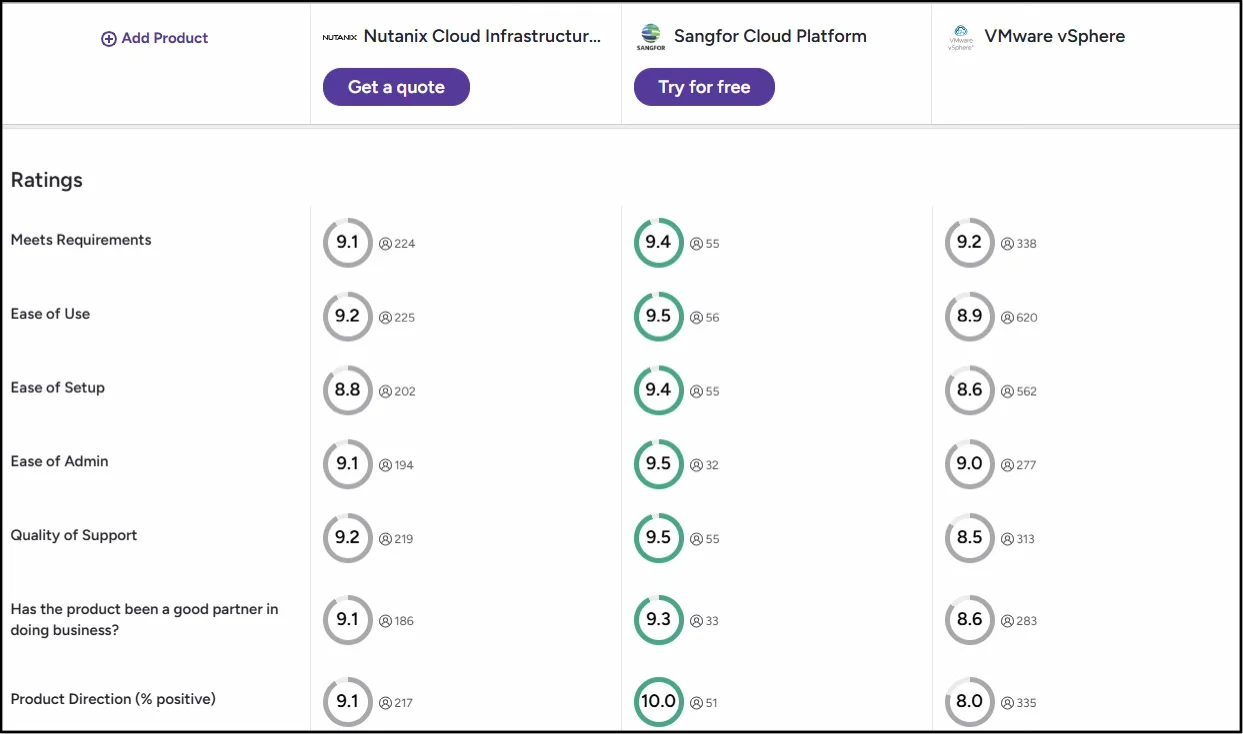
That real‑world impact shows up clearly on independent peer‑review platforms; Sangfor HCI holds a 4.7/5 rating on G2 and 4.8/5 on Gartner.
In late 2025, Sangfor was named a G2 Leader across Hyperconverged Infrastructure, Server Virtualization, and Disaster Recovery, earning multiple Leader badges based entirely on verified customer feedback. The recognition highlighted Sangfor HCI’s strength in unified VM lifecycle management and operational simplicity.
How does Sangfor HCI support the entire virtual machine lifecycle?
From creation and scaling to backup, migration, and recovery, Sangfor HCI manages every VM stage through a single interface powered by the aSV hypervisor, eliminating the need for third‑party add‑ons or fragmented tooling.
How Does Server Virtualization Improve Resource Utilization?
Here’s the simple truth: Physical servers often run at 15–20% utilization. The rest is wasted potential.
Virtualization pools CPU, memory, and storage so workloads share resources intelligently. Average utilization jumps significantly higher than traditional IT infrastructures.
Sangfor aSV hypervisor adds dynamic scheduling and safe overcommitment, which means efficiency increases without sacrificing stability. That’s a win you can explain to finance without slides.
How does server virtualization actually reduce wasted infrastructure capacity?
Virtualization pools resources so workloads consume only what they need. Sangfor’s aSV hypervisor adds intelligent scheduling and safe overcommitment, significantly increasing utilization while maintaining stability, turning idle capacity into measurable efficiency gains.
Virtualization That Feels Human
A reliable virtual machine management platform shouldn’t feel like another system you have to babysit.
Sangfor HCI stands out because it’s practical. It focuses on simplicity, performance, and security, without forcing IT teams into rigid frameworks or endless licensing discussions.
If you’re evaluating enterprise virtualization tools, this is one platform worth experiencing firsthand. Get the Sangfor HCI trial, request a demo, or explore the technical resources on Sangfor’s website. Your future self, especially during the next deployment deadline, will thank you.









