With AMD’s Ryzen 9000 series processors continuing to offer a compelling platform for gaming and productivity builds, motherboard manufacturers have been introducing increasingly specialised AM5 motherboards for enthusiasts. While most high-end models focus on connectivity, storage expansion and premium aesthetics, GIGABYTE has taken a rather different approach with its X870 AORUS INFINITY.

Designed around AMD’s X870 chipset, the X870 AORUS INFINITY is an enthusiast motherboard that puts memory overclocking at the centre of its design. Its unusual two-DIMM layout, rotated CPU socket, extensive onboard overclocking controls and high-capacity VRM are all intended to help enthusiasts push their Ryzen systems beyond conventional operating settings.
As part of GIGABYTE’s 40th-anniversary product lineup, the motherboard also combines a distinctive physical layout with modern connectivity, including PCIe 5.0, USB4, 5GbE Ethernet and Wi-Fi 7.
With an advertised memory overclocking capability of up to DDR5-11400, the X870 AORUS INFINITY certainly looks interesting on paper. However, its specialised design and premium US$799 positioning also raise an important question: is this motherboard worth considering for a high-end PC build, or is it best left to enthusiasts who spend more time tuning memory than playing games?
Taking a Closer Look at the GIGABYTE X870 AORUS INFINITY
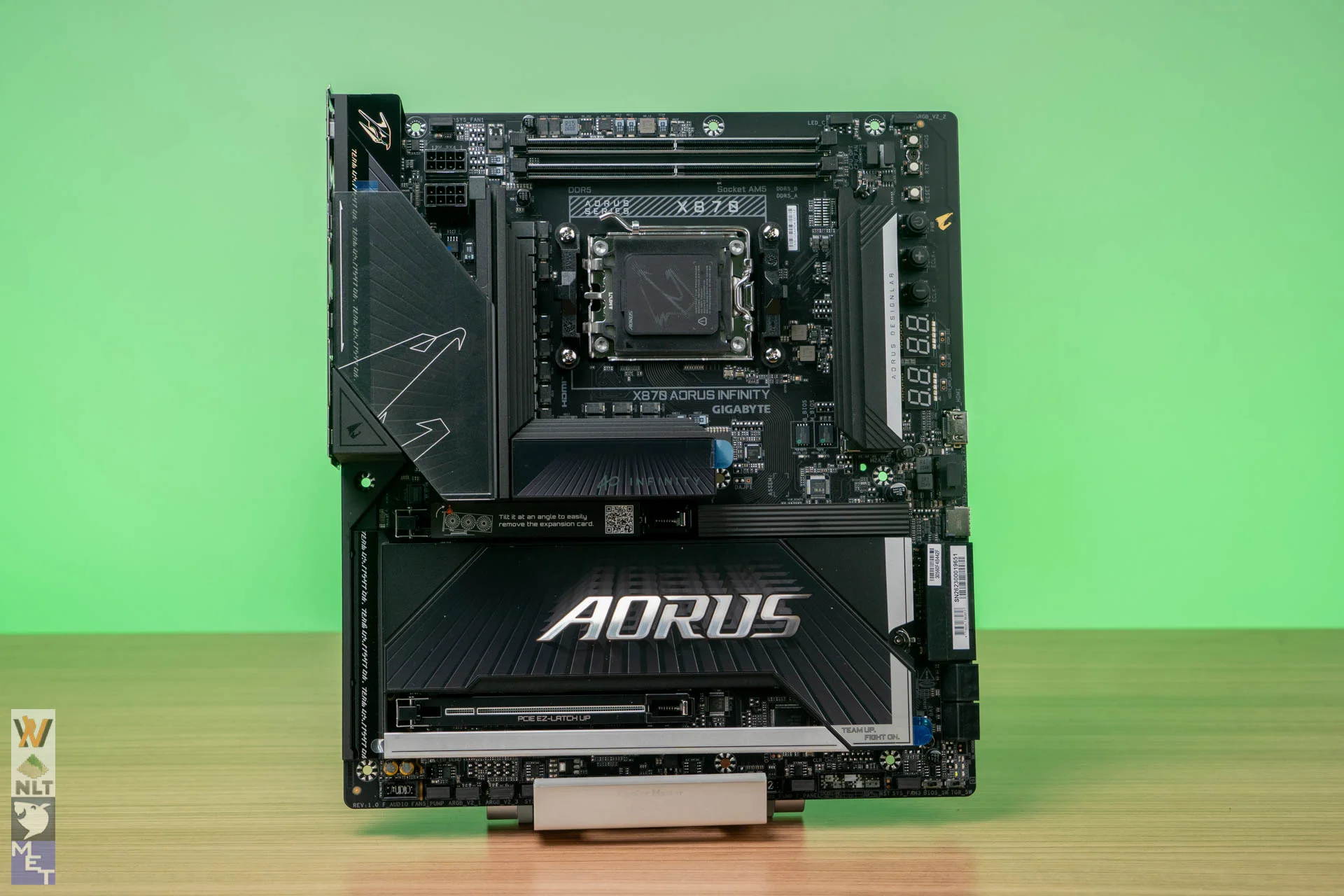
The X870 AORUS INFINITY immediately stands out from conventional AM5 motherboards with its rotated CPU socket and memory layout. Rather than placing the DDR5 memory slots beside the processor, GIGABYTE positions the two DIMM slots above the CPU socket, creating a layout that is quite different from what most PC builders are accustomed to.
This arrangement is not simply a design exercise. By limiting the motherboard to two memory slots and optimising the memory signal path, GIGABYTE is targeting enthusiasts who want to push DDR5 frequencies as far as their processor and memory kit will allow.
The board also features a predominantly dark aesthetic, with substantial heatsinks covering the VRM and storage areas. Its backplate adds structural support, while the overall thermal design is intended to help manage heat from the motherboard’s power delivery and other components. RGB lighting is present around selected areas, including the AORUS branding, but it is relatively restrained compared with motherboards that place visual flair above everything else.

Power delivery is another major part of the design. GIGABYTE equips the X870 AORUS INFINITY with an 18+2+2 digital VRM configuration using 110A Smart Power Stages for the primary CPU power circuitry. Combined with the substantial VRM heatsinks, direct-contact heatpipes and a 10-layer PCB, the motherboard is built to handle demanding Ryzen processors and the sustained loads associated with overclocking.
The CPU socket supports AMD Ryzen 7000, Ryzen 8000 and Ryzen 9000 series desktop processors, subject to BIOS and CPU compatibility requirements. This gives the motherboard access to a broad range of AM5 processors, although its premium features are clearly aimed at users who want to get more out of their hardware.

Memory support is where the specifications become particularly interesting. The two DDR5 DIMM slots accommodate up to 128GB of memory, with GIGABYTE listing speeds up to DDR5-9600 through overclocking profiles and up to DDR5-11400 through advanced manual tuning.
These figures are not guaranteed operating speeds, as the actual result depends on the CPU’s integrated memory controller, memory ICs, BIOS settings and system configuration. Nevertheless, the advertised limits make it clear that memory overclocking is the primary reason this motherboard exists.


Moving towards the expansion area, the X870 AORUS INFINITY provides two full-length PCIe slots, including a primary PCIe 5.0 x16 slot for graphics cards and a secondary PCIe 5.0 slot operating at up to x8. When the second slot is populated, the primary graphics slot drops to x8 operation, so users planning to install multiple expansion cards should take the lane-sharing arrangement into account.


For storage, GIGABYTE includes three M.2 slots and four SATA 6Gb/s connectors. Two of the M.2 slots support PCIe 5.0 SSDs, while the remaining slot operates at PCIe 4.0 x4. The board also includes substantial heatsinks for the M.2 drives, helping manage temperatures when using high-performance NVMe storage.
One important consideration is that the secondary PCIe 5.0 M.2 slot shares bandwidth with the USB4 controller. Depending on the configuration, users may need to reduce the M.2 slot’s bandwidth or disable USB4 to get the full bandwidth available to the SSD. This is worth considering for builds that require multiple high-speed SSDs and fast external storage simultaneously.

A standout feature of the X870 AORUS INFINITY is its rare dual two-digit Q-Code debug displays. Similar to ultra-enthusiast boards like GIGABYTE’s AORUS TACHYON or EVGA’s Classified/Dark series, these displays sit alongside onboard controls and voltage points to aid with system initialization, boot failures, and unstable configurations.
They are especially useful during aggressive memory tuning, helping diagnose where POST stops and pair well with the board’s retry and CMOS-clear buttons for easier recovery. While documentation doesn’t clearly explain the exact independent purpose of the second display, this dual setup underscores that the board is built for serious overclockers rather than just gamers.
It is also a reminder that the X870 AORUS INFINITY is not merely a premium gaming motherboard with a powerful VRM. GIGABYTE has included hardware features intended to make repeated testing and troubleshooting more manageable for enthusiasts who enjoy pushing their systems to the limit.

While the rear I/O isn’t as expansive as some flagship boards, the X870 AORUS INFINITY packs robust connectivity. Highlights include a 40Gbps USB4 Type-C port (with DisplayPort output), multiple 10Gbps/5Gbps Type-A ports, and a front-panel USB-C header supporting 20Gbps USB 3.2 Gen 2×2 and up to 65W charging.
Networking features a fast Realtek 5GbE Ethernet controller and Qualcomm Wi-Fi 7 (320MHz, Bluetooth 5.4), while display output is handled via HDMI and USB4 DP alongside an extra HDMI port for case-mounted displays. Audio is driven by the Realtek ALC1220 codec with optical S/PDIF. Rounding out the board are a rear BIOS update button and an onboard OC Ignition button, providing a well-rounded, high-end feature set despite a slightly restrained port count.
BIOS


GIGABYTE provides a UEFI BIOS with support for processor configuration, memory tuning, voltage adjustment and system monitoring. For a motherboard focused on extreme overclocking, the BIOS is an important part of the overall experience, as users need access to detailed settings when adjusting memory frequencies and timings.
The board supports Q-Flash and Q-Flash Plus, allowing users to update the BIOS through GIGABYTE’s firmware utilities. Q-Flash Plus is especially useful when preparing the system for a different processor or recovering from a configuration that prevents normal booting, provided the update is performed according to GIGABYTE’s instructions.
Another notable feature is the inclusion of two 64MB BIOS ROMs. The DualBIOS implementation provides an additional layer of firmware resilience, while also allowing users to maintain different BIOS configurations for different scenarios.
Memory Performance Test
As the X870 AORUS INFINITY is designed primarily for enthusiasts, memory overclocking deserves particular attention. For users who simply enable EXPO and leave everything else at its default settings, the motherboard’s advanced tuning options may not see much use. For experienced overclockers, those same options are a major part of what makes the board interesting.
Most AM5 motherboards provide four DIMM slots to accommodate larger memory configurations, but GIGABYTE has opted for two slots instead. This allows the memory layout to be optimised for high-frequency operation, reducing some of the signal-integrity challenges associated with more complex memory configurations.

GIGABYTE officially lists support for DDR5-9600 through overclocking profiles and up to DDR5-11400 through advanced manual tuning. The latter figure is particularly ambitious and places the motherboard firmly in the extreme-overclocking category. For our use case, DDR5-8400 is the highest we can achieve on our KLEVV CRAS V RGB DDR5-7200 kit.
However, there is an important distinction between a motherboard supporting a particular memory speed and a complete system being able to operate at that speed reliably.

For everyday users, DDR5-6000 or another stable EXPO configuration is a more practical starting point than chasing the highest possible frequency. Depending on the processor and workload, higher memory speeds can improve performance, but the gains are not necessarily proportional to the increase in frequency.
For enthusiasts who enjoy experimenting with timings, voltages and memory-controller settings, however, the X870 AORUS INFINITY provides a platform designed to explore those limits. Its two-DIMM configuration and dedicated controls are intended to make that process more convenient than it would be on a conventional motherboard.
Do note that the integrated memory controller in your CPU plays a major role in determining the maximum achievable frequency. Memory IC quality, module capacity, BIOS maturity, voltages and timings all influence the final result. As a result, users should not expect every Ryzen processor to achieve DDR5-11400 simply by installing a compatible memory kit.
Thermal Behaviour
The X870 AORUS INFINITY uses substantial heatsinks to manage temperatures around the VRM and M.2 storage areas. Its power delivery design includes heatpipes and large heatsink surfaces, while the rear backplate provides additional structural support and contributes to thermal management.


The motherboard’s VRM temperature peaked at approximately 54°C on an open-air test bench using a 360mm AIO liquid cooler. This is a promising result for the power delivery system, but your mileage may vary depending on your setup.
As with any motherboard, the overall thermal behaviour of a completed system will depend on the CPU cooler, case airflow and component selection. For users who intend to run demanding workloads or experiment with overclocking, a well-planned cooling configuration remains important.
Final Thoughts
Priced at US$799, the X870 AORUS INFINITY is a highly specialised AM5 motherboard built entirely around memory overclocking. It features a unique two-DIMM layout with a rotated CPU socket, a robust 18+2+2 VRM with 110A power stages, and dedicated onboard controls paired with dual Q-Code debug displays. Beyond its extreme overclocking credentials, the board is well-equipped with modern connectivity, including PCIe 5.0 expansion, multiple M.2 slots, USB4, 5GbE Ethernet, and Wi-Fi 7.
However, these enthusiast-focused choices come with distinct compromises. The two-DIMM setup limits memory expansion compared to traditional four-slot boards, shared bandwidth between the secondary PCIe 5.0 M.2 slot and the USB4 controller requires careful planning, and the rear I/O is relatively restrained for its flagship price point. Because of this, the motherboard is difficult to justify for a conventional gaming PC, where standard, more affordable AM5 option like the B860M AORUS Elite Wifi6E offer comparable everyday performance at stock speeds.
Ultimately, the X870 AORUS INFINITY is best suited to serious enthusiasts and competitive overclockers who can fully leverage its specialized hardware. For builders who simply want a high-end system to run at default settings, a more affordable X870 or B850 motherboard is a far more sensible choice.