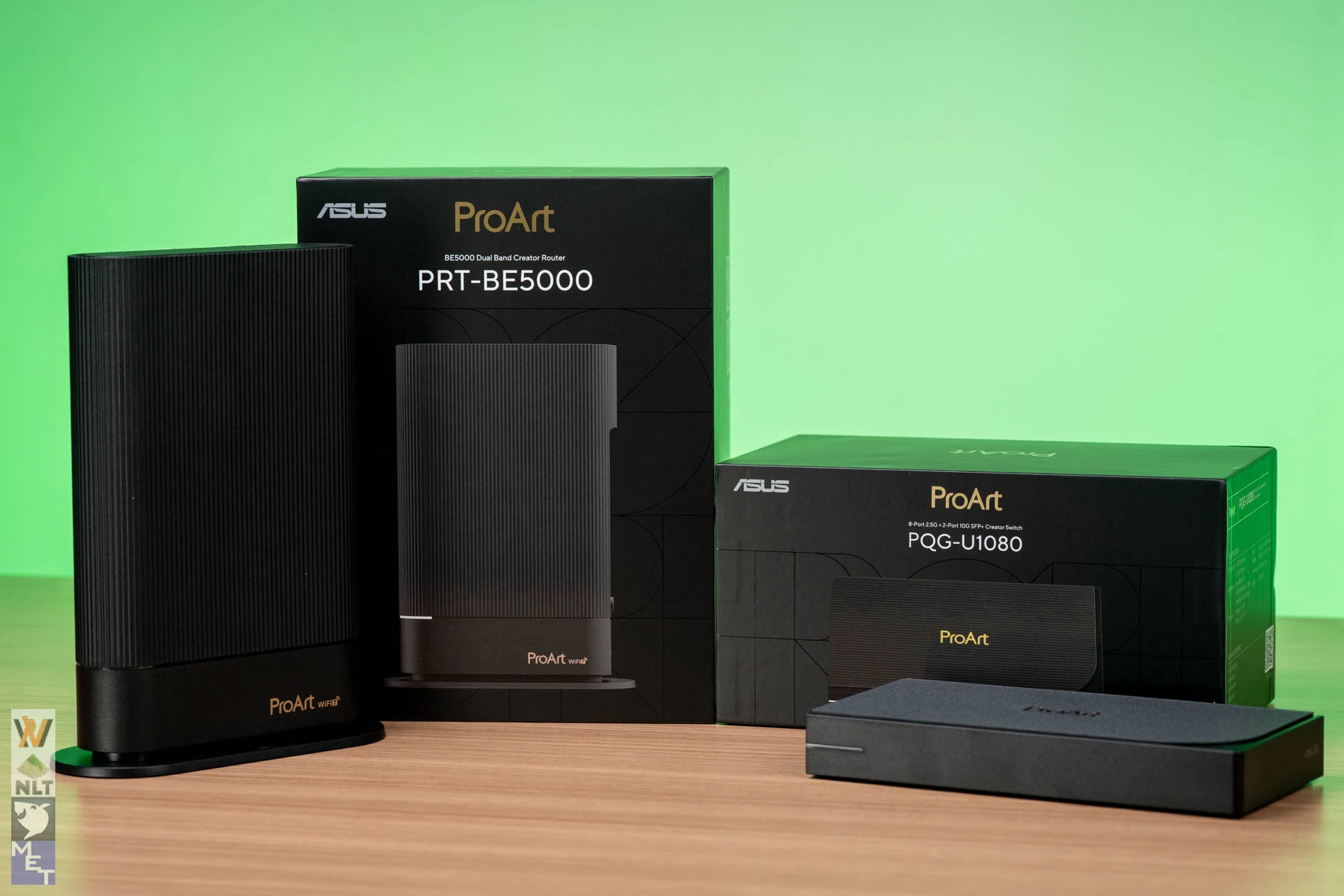
ASUS is expanding its ProArt design philoshphy into local network hardware – introducing the ProArt PRT-BE5000 Router and the ProArt PQG-U1080 Switch. Today, we have the opportunity to take a quick look at both of these devices, without further ado, let’s find out how these two devices look and feel in hand, their specs, and how their features fit into a real-world creator workspace.
ASUS ProArt Router PRT-BE5000

The PRT-BE5000 represents ASUS’s first creator-dedicated wireless router under the ProArt brand. It focuses on low latency, Wi-Fi 7 features, and a clean studio aesthetic rather than aggressive, angular “gaming” accents.
Official Specifications
| Feature | Specification |
| Wi-Fi Standard | Dual-Band Wi-Fi 7 (802.11be) |
| Wireless Speed | BE5000 (up to 4,320 Mbps on 5 GHz + 688 Mbps on 2.4 GHz) |
| Wi-Fi 7 Features | 4K-QAM, 160MHz channels, Multi-Link Operation (MLO) |
| Processor & Memory | Quad-core processor, 1GB DDR4 RAM, 128MB SPI NAND Flash |
| I/O Ports | • 1 × 2.5GbE WAN Port • 1 × 2.5GbE LAN Port • 3 × 1GbE LAN Ports |
| Antennas | Internal antenna array (2 × 2.4 GHz, 3 × 5 GHz) |
| Dimensions | 131 × 37.5 × 200 mm |
| Coverage Rating | Up to 2,200 sq. ft. (Mesh expandability via ASUS AiMesh) |
Included Accessories

Inside the box, ASUS keeps things straightforward:
- ProArt PRT-BE5000 Router
- 12V / 1A Power Adapter
- RJ-45 Ethernet Cable (Cat 6)
- Quick Start Guide & Warranty Documentation
Overall Design & Aesthetic

If you’re used to ASUS ROG or TUF routers, the PRT-BE5000 is a complete departure. It sports a sleek, matte-black rectangular chassis with straight lines and subtle rounded edges. There are no external spider-like antennas sticking out — everything is contained internally to keep your desk or media console clutter-free. Subtle gold/bronze ProArt accents give it an understated, premium look that blends into a studio alongside ProArt monitors or desktop cases.
I/O Ports & Layout

All connection points are located cleanly along the rear panel:
- Power Input & Physical Toggle Switch: Easy hard reset without pulling cables.
- Dual 2.5G Ports: Dedicated 2.5G WAN for high-speed internet and a matching 2.5G LAN port for directly feeding a workstation or main network switch.
- Triple 1G LAN Ports: Standard ports for auxiliary hardware like printers or smart hub bridges.
- WPS & Reset Buttons: Tucked discreetly alongside the power jack.
Wi-Fi 7 for Creators

The ProArt Router PRT-BE5000 uses Wi-Fi 7 to push combined wireless speeds up to 5,000 Mbps, giving creators the stability needed for demanding workloads. It keeps real-time collaboration, large file transfers, and video conferencing seamless—even across busy studio environments packed with connected devices.
Dashboard UI & Feature Set


Under the hood, the PRT-BE5000 runs an adapted version of ASUSWRT styled with a custom ProArt Router Control Center UI.
- Creator-First Adaptive QoE: Instead of standard gaming-focused QoS, the ProArt dashboard allows you to prioritize content creation tasks in real time (e.g., heavy file uploading, video rendering streams, or cloud backup syncs) over general traffic.
- Smart Home Master & Multi-SSID: Allows you to isolate IoT devices or dedicated VPN connections on separate network subnets without cluttering your main studio Wi-Fi.
- Triple-Level Security: Pre-installed AiProtection cloud database security, encrypted VPN client/server support, and safe browsing controls out of the box.
Part 2: ASUS ProArt Switch PQG-U1080

Wireless is convenient, but large video assets and multi-cam footage often demand uncompromised wired bandwidth. The ProArt Switch PQG-U1080 is built as an unmanaged companion switch to eliminate local bandwidth bottlenecks between editing stations and storage units.
Official Specifications
| Feature | Specification |
| Switching Capacity | 80 Gbps |
| Forwarding Rate | High-density packet processing for continuous large-file transfers |
| I/O Ports | • 8 × 2.5GbE RJ45 Ethernet Ports • 2 × 10GbE SFP+ Fiber/DAC Ports |
| Jumbo Frames | Up to 10 KB |
| Buffer Memory | 1MB (8 Mbit) |
| Power & Thermal | 12V / 1A power consumption; fanless, silent passive cooling |
| Dimensions & Weight | 180 × 89.5 × 26 mm | 260g |
Included Accessories

- ProArt PQG-U1080 Switch
- External 12V Power Adapter
- Multi-Surface Mounting Kit (includes hardware for wall mounting, table-leg mounting, and magnetic pads)
- Quick Start Guide
Overall Design & Studio Mounting Options

The PQG-U1080 features a solid metal chassis in matching ProArt black. Because it is passively cooled (no internal fans), it runs completely silent — a major bonus if you record audio or voiceovers near your desk setup.
ASUS put extra thought into physical mounting versatility for this unit:
- Desktop Placement: Compact footprint fits under a monitor riser.
- Magnetic Mounting: Ships with magnetic attachments so you can snap it directly to the side of a metal desk frame or PC chassis.
- Table-Leg / Wall Mounting: Includes bracket options to mount it under a desk or flush against a wall to keep cable runs hidden.
I/O Ports

- 8 × 2.5G RJ45 Ports: Upgrades standard Cat5e or Cat6 home wiring from 1G to 2.5G without needing to pull new cables.
- 2 × 10G SFP+ Ports: High-bandwidth uplinks intended for connecting directly to a 10G NAS (Network Attached Storage) array or linking back to a main fiber backbone.

Front Panel LED Toggle: Includes a physical slide switch on the side to turn off all port activity LEDs. If the switch sits directly in your line of sight while editing, you can eliminate distracting blinking lights entirely.
Functionality & Plug-and-Play Integration
Because the PQG-U1080 is an unmanaged switch, there is no software dashboard or complex IP configuration required. You simply connect power, run an Ethernet drop from the PRT-BE5000’s 2.5G LAN port into Port 1 on the switch, and every connected workstation or NAS immediately gains high-speed local interconnectivity.
Recommended Setup

If your editing PC and NAS supports 10Gbe networking, this is the perfect networking setup to enable high-speed creator workflow – accessing all your high-res footages safely stored in the NAS without breaking a sweat.
Real Life Speed Test
We conducted a few local file transfer to test the capabilities of the equipment.
Test 1 – NAS to PC File Transfer via 2.5 Gbe LAN

Test Setup:
- PRT-BE5000 linked to PQG-U1080 via 2.5 Gbe LAN
- Network fully managed by PRT-BE5000
- NAS connected to PQG-U1080 via 2.5 Gbe LAN
- PC connected to PQG-U1080 via 2.5 Gbe LAN
The physical connection speed is 2.5 Gbps (2,500 Mbps), the mathematical conversion would be 312.5 MB/s. Keep in mind this is theoretical speed.
In a standard SMB/NFS file transfer, overhead from networking protocols and file system management consumes roughly 5%~10% of the bandwidth, which means the real world throughput should be 270~295 MB/s. Our test result shows it matches perfectly with our math.
Test 2 – PC to Laptop File Transfer via Wi-Fi 7

Test Setup:
- PC A connected to PRT-BE5000 via Wi-Fi 7 5GHz Band
- Laptop B connected to PRT-BE5000 via Wi-Fi 7 5GHz Band
On the BE5000’s 5 GHz band, each Wi-Fi 7 laptop connects with a maximum theoretical link rate of 2,882 Mbps by using 2×2 MIMO, 160 MHz width, and 4096-QAM. Since both computers are connected wirelessly to the same router on the same channel, they must share the airtime. Under ideal theoretical conditions, the transfer speed for a 10GB file between two Wi-Fi 7 laptops connected to the PRT-BE5000 is capped at approximately 1,441 Mbps (about 180 MB/s).
The real life transfer speed reaches about 144MB/s which is perfectly 80% of the theoretical max speed. The rest of the 20% are reserved for Wi-Fi protocol overheads and file transfer protocol overhead.
Final Thoughts: Who Is This Combination For?
Without running lab stress tests or throughput decay benchmarks across dozens of drywall partitions, what stands out most about the ASUS ProArt PRT-BE5000 and PQG-U1080 is how intentionally they are designed around a creator’s workflow.
Networking gear in home offices and small studios is often an afterthought — either hidden away in a closet because it looks like a neon-lit gaming spaceship, or bottlenecked by standard 1GbE ports that choke multi-gig fiber connections and modern NAS drives.
ASUS addresses both issues with this pair:
- The PRT-BE5000 Router acts as a future-proof wireless bridge with Wi-Fi 7 features, multi-gig WAN/LAN handshakes, and a dashboard tailored toward prioritizing heavy creative rendering and upload tasks over standard traffic.
- The PQG-U1080 Switch provides silent, fanless 2.5G port expansion with twin 10G SFP+ uplinks, offering versatile desk/wall/magnetic mounting so you can keep cable runs completely hidden.
If you are a content creator, editor, or small studio operator looking to upgrade to multi-gig local speeds without battling noisy enterprise switches or garish RGB gaming gear, this ProArt networking duo delivers a sleek, plug-and-play foundation that looks right at home in a modern creative workspace.